
Introduction
While critics worry students use AI to cheat, our research reveals something different: students are using AI to learn. At UC Berkeley, many students in technical fields are using AI to teach them rather than do for them: AI was a supplement to the role of professor, TA, or tutor. It was a resource for understanding difficult material, clarifying concepts, and refining technical work.
This finding emerged from an eight-month mixed-methods research project to understand how UC Berkeley students in Electrical Engineering, Computer Science, Design, and Data Science are using artificial intelligence in their academic workflow. We focused on gathering perspectives from these fields through in-depth interviewing and survey responses as they provide a lens for understanding how the next generation of developers are currently navigating AI. Our research began with a simple observation: AI use is no longer a unique edge-case; it is pervasive. Google’s 2025 DORA report found that more than 90% of professionals already use AI in their day-to-day work (State of AI-assisted Software Development 2025). As these tools become foundational to industry, it’s crucial for future developers to learn how to work with them thoughtfully.
Students as learners, AI as teacher
Each of the students we spoke to described AI as a supplement to their typical learning resources. These engineering students stated that, rather than using AI to finish tasks for them, they wanted to use AI to help them understand the material, refine their technical skills, and quickly iterate on project ideas. AI was able to offer quick advice, further resources to check out, and high-level conceptual guidance. Before AI, this type of work was often limited to the scope of an office hour with a professor or a TA. If students wanted to discuss an idea for a project, for example, this was limited to the short amount of time allocated to each student in an office hour. Additionally, students felt that using AI gave them more time to think conceptually, since they were able to spend less effort on low-level details. It also gave them the chance to step into the kind of project shaping role you would expect from a Product Manager or Creative Director.
Use for conceptual understanding
Across our interviews, a clear pattern emerged: students viewed AI as a learning companion rather than a productivity tool. In all 11 interviews, participants used the terms “tutor” or “teacher” when describing their relationship to AI.
“AI is a teacher … in the sense that it is most helpful for understanding dense content and potentially parts of code that are prewritten in the database to allow for fundamental understanding of the project.”
“I use [AI] as my own private tutor … to [cover] any specific topics in the classes or lectures … not just in CS classes but in all classes.”
“For me, AI has been most helpful when I’m studying for a class—whether that’s getting clarification on an assignment or just learning a specific topic. I’ve found that it’s really good at explaining things in a simple manner.”
Students engaged AI strategically to refine understanding, strengthen skills, and prepare for class assessments. Students also mentioned that using AI has sped up their time-to-understanding for core concepts as they can simply engage with a chat bot rather than searching Stack Overflow or other developer resources. They described using AI to streamline study sessions, clarify assignment goals, and identify gaps in knowledge. In this way, using AI allowed students to quickly iterate on ideas and to think collaboratively with a brainstorming partner.

Use for skill development
According to our survey results from May 2025 (N=85), the three primary functions students mentioned when describing their AI use were: identifying and fixing code errors, and explaining new programming concepts (see figure 1).
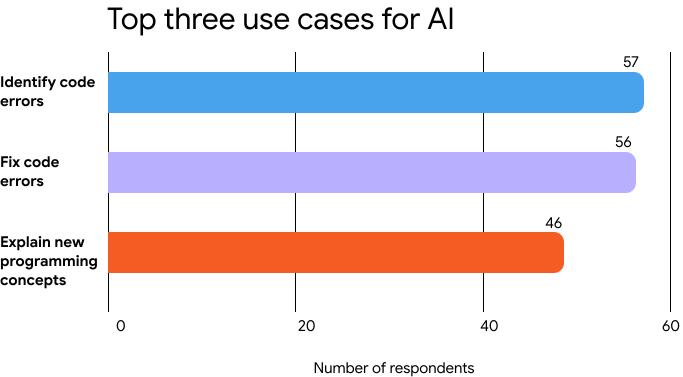
Before AI tools became prevalent, students relied on instructor support during office hours and lab sessions, or searched through online forums like Stack Overflow for answers. Both approaches had inherent limitations: instructor availability was constrained by scheduling, while online searches required students to parse through multiple threads to find solutions applicable to their specific problem. This finding also importantly gestures at the ways in which students are using AI to further refine their understanding of low-level issues such as syntax, trouble-shooting, and best practices. Many computer science students also mentioned that using AI to catch small errors allowed them to be more creative and approach problems from a conceptual/systems-thinking position.
“I spend less time actually coding and more time on big picture ideation. Now, my time is spent thinking through logic, concepts, and coming up with ideas creatively, rather than producing code manually.”*
Use for summarization and study direction
Several students discussed using AI to extend their research practices and study routines. One student, for example, used AI to summarize and evaluate academic papers mentioned in class:
“For my classes, I try to use [AI] to analyze the extra papers that the professor references in lecture, because oftentimes the professor cannot fully go into the details of each paper they reference. … [AI is useful for] summarizing the papers for me and giving insights into what the paper is about generally. This allows me to quickly decide whether to spend more time on a paper or move on to another. [It helps me be efficient when deciding on a research direction.]”
This gets at a core tension in undergraduate engineering courses; a professor often needs to limit the scope of what is presented to make sure that students can successfully integrate core skills into their practice. This leaves out many interesting edge-cases and broader themes that could be relevant to some students but simply cannot be addressed in the scope of a course.
Another student described using AI as a study guide:
“I begin by asking which specific lecture I need to watch before I start the project.”
These examples illustrate how students weave AI into the early stages of research and coursework, using it to scope relevance, sequence learning tasks, and manage time efficiently.
Many used AI metacognitively, as a way to identify what they did not yet understand or needed to study further.
Of course, these computer science students were not limited to a single use case of AI within a project. Many described integrating AI across multiple stages of their workflow, drawing on it for ideation, data exploration, and technical execution.
“I told [AI] what kind of project I was interested in and asked if it had any ideas or suggestions. I also asked which parts of the dataset would be useful if I wanted to focus on data cleaning… I used it to help with coding-related questions, like which type of chart would best visualize certain patterns in the data, and how to write the code to generate that chart.”
At the same time, students emphasized discernment, knowing not only when to use AI but also when to step back from it.
“I use [AI] to see what the correct syntax should be. But generally I code on my own and use AI for specific error codes and stylistic issues. If I do use AI for a larger portion of any project, I ensure to understand the code flow, because a lot of times the code can be totally incorrect.”
Together, these accounts portray AI not as a producer of finished work but as a scaffold for exploration, offering conceptual guidance, technical feedback, and moments of reflection throughout the creative process. They also reveal a broader awareness among students of the importance of maintaining agency and critical oversight in their collaboration with AI.
In describing AI as a tool for learning, students made it clear that part of the motivation for AI use was a desire for more educational access. This is reasonable; instructor and TA time are limited. This could imply that the use of AI is extending the office hour, meaning that instruction can happen any time. At this time, it remains to be seen whether or not this type of use will be a replacement for or a supplement to traditional classroom instruction.
Insights
-
Continuous access: AI now functions as a 24-hour, on-demand office hour, extending academic support beyond traditional classroom settings.
-
Active learning aid: Students use AI not only to answer questions but to clarify what they do not know, prioritize study efforts, and refine problem-solving strategies.
-
Pedagogical integration: AI has become part of the learning process itself, creating opportunities for educators to acknowledge and guide its use rather than prohibit it.
Conclusion
The question facing education in 2025 is not whether students will use AI, but how they will use it. Our research with UC Berkeley students reveals an encouraging answer: students are using AI as a tutor, not a shortcut.
Rather than replacing learning, AI is reshaping it. Students approach AI iteratively by prompting, testing, and correcting. They use it to debug code, unpack dense concepts, and access help when human support is unavailable. This shifts their efforts away from mechanical tasks like syntax toward higher-level reasoning and design. In doing so, students are developing a new literacy: knowing how to prompt effectively, interpret responses, and integrate AI-generated content thoughtfully.
These findings carry clear implications for instructors, students, and developers:
- Instructors should design assignments that acknowledge AI as a learning resource while preserving spaces for independent reasoning. Otherwise, they risk policies that push AI underground rather than teaching students to use it critically.
- Students should lean into AI’s tutoring potential to strengthen core concepts and build confidence. This ensures AI remains a learning aid, not a crutch that impacts their understanding of core concepts.
- Developers should create tools with education in mind by designing systems that provide formative feedback rather than just answers. This ensures that students have the opportunity to engage in these iterative learning processes that they have described.
AI is here to stay in higher education. The students we studied aren’t using it irresponsibly; they’re learning how to learn with it.